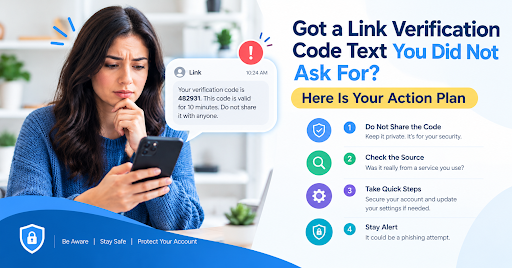
Got a Link Verification Code Text You Did Not Ask For? Here Is Your Action Plan
A link verification code text can feel alarming when it arrives out of nowhere. Your heart rate goes up, and suddenly you are thinking about bank accounts and passwords. Take a breath. Most of the time, you can settle the question in about ten minutes by following a clear order of steps. This guide gives you that order, from reading the message properly to deciding whether you need to act on anything else. Think of it as a checklist you can use the next time a code shows up on your phone.
Step one: Read the message carefully
Start by reading the whole message instead of just glancing at the number. Check who it says it is from, what it claims the code is for, and how long it stays valid. Many genuine messages include a short reminder not to share the code with anyone. If the message asks you to click a link, send your password, or confirm your identity somewhere else, treat it with extra caution. Real verification texts rarely ask for more than typing the code into a screen you already opened yourself.
Step two: Think about what you did recently
Next, look back over the last few days. Did you buy something online? Did you sign in to an account from a new phone or laptop? Did you try to reset a password or set up a new service? Many verification texts come from actions people completely forgot about. A checkout page that asked for your number, or a login on a friend’s device, is enough to trigger a code.
Here is an example. Ayesha gets a code at nine in the evening while she is at home. She remembers that she ordered a phone case earlier that day and saved her details at checkout. The code matches that purchase, so she enters it on the store’s page, and the matter is closed. Nothing else needs to happen.
Step three: Check your accounts and bank activity
If you cannot remember any action that could explain the code, check the places where a real problem would show up. Open your bank app and look at recent transactions. Review your card statement for charges you do not recognize. Look at the login history on your email account, because email is often the key to your other accounts. Also check whether you received any unexpected login alerts or password reset emails.
You do not need to panic if everything looks normal. A single code with no other signs is usually a harmless event, most likely a typing mistake or a forgotten checkout. Keep an eye on your accounts for the next few days and then move on.
Step four: Never share the code
This step matters more than any other. Do not give the code to anyone, even if they sound official. A caller might say your account is at risk, that a payment is pending, or that they need the code to cancel an order. Real companies do not ask for verification codes in this way. If a call like this happens, hang up. Then contact the company using the phone number listed on its official website or inside its app.
Step five: Strengthen your accounts if something looks wrong
If you spot anything suspicious, act quickly but stay calm. Change the password of your email account first, because it controls password resets for many other services. Use a strong, unique password and turn on two-factor authentication. Where you can, choose an authenticator app instead of text messages, since app-based codes are harder to intercept. Then review the list of devices signed in to your account and remove any you do not recognize.
If you think your phone number has been taken over, contact your mobile carrier using the number on its official website or the support page of your phone. Ask about adding an account PIN or passcode. This extra step makes it harder for someone to move your number to a new SIM card without your approval.
Beyond protecting your accounts, understanding how digital tools handle online processes can also help you stay informed about security. Businesses use automation to manage repetitive tasks, improve workflows, and reduce manual effort. If you want to understand how robotic process automation works in business settings, read this guide on Droven.io RPA and Business Automation. Learning how these systems work can help readers better understand the role of automation in modern digital services.
Why you should not reply to the message
Many people instinctively reply to a confusing message, asking “Who is this?” That reply can be a trap. A response confirms that your number is active and that someone reads these texts, which can lead to more messages or more targeted scams. The safest choice is to leave the message unanswered, check your accounts through the official app or website, and keep the message until you have finished checking. If the texts continue, block the sender through your phone’s settings and write down what happened.
What if the codes keep coming back?
If you receive several codes in one day, or codes keep arriving after you have already checked your accounts, do not assume the worst, but do not ignore them either. Pause any sign-in attempts you are not sure about. Think about whether anyone else in your home or office might have used your number at a checkout. Then contact the company named in the message through its official support page. Keep screenshots that show the time and sender, because these details help support teams trace the problem faster.
When to report it
If you believe a scam is behind the message, report it. In the United States, the Federal Trade Commission accepts fraud reports at ReportFraud.ftc.gov. In other countries, look for your national consumer protection office or cybercrime reporting service. Your mobile carrier and the company named in the message may also want to know what happened. Reporting helps others recognize the same pattern, and it can help you too if money or personal information was involved.
Final thoughts
Most link verification code texts turn out to be ordinary security messages. Read the message, check what you did recently, never share the code, and secure your accounts if something looks wrong. For more quick guides on digital safety, you can read the latest updates in our General News section, or explore more helpful tools and guides at Toolsimpli.